
The Only 5 Schema Types a Blog Needs (Copy-Paste JSON-LD)
17 minutes read
Google killed FAQ rich results in May 2026, HowTo in 2023, and the sitelinks search box in 2024. Five types still earn their place. Copy-paste JSON-LD for each, what it does in Google rich results versus AI answers, and the eight cargo-cult types to delete.
Five types cover a blog: Organization, Person, BlogPosting, FAQPage, and BreadcrumbList. Copy the blocks below, swap the values, ship them.
Everything else in the schema.org vocabulary is either built for a different kind of site or aimed at a Google feature that has since been switched off. The vocabulary holds more than 800 types. A blog needs five, and one of those five stopped producing a search result of any kind in May 2026 — yet it still belongs on the list. Understanding why is the difference between markup that survives the next deprecation and markup that does not.
What JSON-LD actually does for a blog in 2026
Structured data does two separate jobs, and confusing them is why most schema advice ages badly.
Job one is rendering. You mark something up, Google draws a widget on the results page. Stars, a dropdown, a carousel, a search box. This is the half everyone optimises for, and it has been shrinking for three straight years.
Job two is resolving. You state, in a format a parser cannot misread, that this page was written by this Jane Mercer, published by this company, and sits at this point in a hierarchy. No widget appears. Nothing looks different. But a retrieval system now has an unambiguous fact instead of a string it has to guess about.
Call it the render/resolve split. Rendering is a Google product decision that can be revoked on a Tuesday. Resolving is a statement of fact that no one can deprecate, because it was never a feature.
The rendering half keeps getting smaller
| Feature | Status | Date |
|---|---|---|
| HowTo rich results | Removed, desktop and mobile | September 2023 |
Sitelinks search box (WebSite + SearchAction) |
Removed | 21 November 2024 |
| Book Actions, Course Info, ClaimReview, Estimated Salary, Learning Video, Special Announcement, Vehicle Listing | Removed | 12 June 2025 |
| FAQ rich results | Removed | 7 May 2026 |
Google's stated reason each time was the same: the features were not widely used and no longer added enough value to justify the space. The FAQ removal is the most recent and the most instructive. Google's notice reads:
FAQ rich results are no longer appearing in Google Search. We will be dropping the FAQ search appearance, rich result report, and support in the Rich results test in June 2026. To allow time for adjusting your API calls, support for the FAQ rich result in the Search Console API will be removed in August 2026.
Note what that notice does not say. It does not say to remove the markup. FAQPage remains a valid schema.org type, and Google is explicit that unused structured data causes no problems in Search. The feature died. The vocabulary did not.
The part most schema guides get wrong
A 2025 test by SearchVIU built a page with the same product price planted in eight different places — visible HTML, JavaScript-rendered text, JSON-LD, Microdata, RDFa — then asked five AI systems to find it.
Zero out of five retrieved the price that existed only in JSON-LD. Not ChatGPT, not Claude, not Gemini, not Perplexity, not Google AI Mode. On a live fetch, the assistants read the visible page and skipped the script tag entirely. Gemini did best overall at 4 of 8 prices, and it got there through rendered content, not markup.
So the popular claim that you should "add schema for AI" is half right in a way that matters. Schema reaches AI answers through the index, not through the fetch. Microsoft's Fabrice Canel confirmed at SMX Munich in March 2025 that schema helps Bing's LLMs understand web content, and Bing's index feeds Copilot and ChatGPT search. Google's index feeds AI Overviews and AI Mode. That pathway is real.
The direct pathway is not. Which gives you a rule:
Never let a fact live only in your JSON-LD. If an assistant fetching your URL right now would miss it, the markup did not save you. Structured data confirms what your visible text already says. It does not substitute for it.
This is the same reason plym serves clean Markdown to agents alongside HTML to humans. The index gets your schema. The agent hitting your URL gets readable prose. Two channels, two audiences, and the fact has to be in both.
The 5 schema types every blog needs
Each block below is valid JSON-LD, ready to paste inside a <script type="application/ld+json"> tag in your <head>. Swap example.com for your domain.
1. Organization — establishes who publishes this
Organization is the entity record for your company. It is the anchor every other type points back to, which makes it the one to implement first.
Google recommends putting it on your home page or a single dedicated page such as an About page. Not on every page. There are no required properties; add the ones that are true.
{
  "@context": "https://schema.org",
  "@type": "Organization",
  "@id": "https://example.com/#organization",
  "name": "Example",
  "url": "https://example.com/",
  "logo": {
    "@type": "ImageObject",
    "url": "https://example.com/static/logo.png",
    "width": 512,
    "height": 512
  },
  "description": "Example builds developer tooling for distributed systems.",
  "foundingDate": "2021-04-01",
  "sameAs": [
    "https://www.linkedin.com/company/example",
    "https://github.com/example",
    "https://x.com/example",
    "https://en.wikipedia.org/wiki/Example"
  ]
}
Google rich results: a knowledge panel candidate, plus the publisher logo attached to your articles. The logo must be crawlable, indexable, and at least 112×112 pixels.
AI answers: this is the highest-leverage block on your site and almost nobody treats it that way. sameAs is how a retrieval system links your company name to its Wikipedia entry, its LinkedIn page, its GitHub org. Ambiguous brand names get resolved or dropped, and a resolved entity is one an assistant can cite by name with confidence.
The mistake to avoid: absolute URLs only. A relative logo path like /static/logo.png is a common templating slip and it costs you the publisher logo.
2. Person — establishes who wrote this
Person on its own is fine inside an article's author field. On a dedicated author page, wrap it in ProfilePage instead, which is a feature Google still actively supports.
{
  "@context": "https://schema.org",
  "@type": "ProfilePage",
  "@id": "https://example.com/authors/jane-mercer#profilepage",
  "dateCreated": "2024-03-11T08:00:00+00:00",
  "dateModified": "2026-07-14T11:20:00+00:00",
  "mainEntity": {
    "@type": "Person",
    "@id": "https://example.com/authors/jane-mercer#person",
    "name": "Jane Mercer",
    "url": "https://example.com/authors/jane-mercer",
    "image": "https://example.com/media/jane-mercer.webp",
    "description": "Twelve years on storage engines. Writes about database internals.",
    "jobTitle": "Principal Engineer",
    "worksFor": { "@id": "https://example.com/#organization" },
    "knowsAbout": [
      "Postgres",
      "write-ahead logging",
      "query planning"
    ],
    "sameAs": [
      "https://github.com/janemercer",
      "https://www.linkedin.com/in/janemercer",
      "https://scholar.google.com/citations?user=xxxxx"
    ]
  }
}
ProfilePage requires exactly two things: mainEntity (a Person or Organization) and name. Everything else is optional.
Google rich results: eligible for the Profile page appearance in Discussions and Forums surfaces. Valid on author pages, about-me pages, and employee pages. Not valid on a store home page.
AI answers: sameAs and knowsAbout do the work. They connect a byline to a verifiable identity with a track record. When an assistant weighs whether to cite a claim about write-ahead logging, a resolvable author who demonstrably works on storage engines is a different signal from a bare name string.
The mistake to avoid: Google is specific that author.name should contain the name and nothing else. Not "Dr. Jane Mercer, Principal Engineer at Example." Not "The Example Team." Just the name. Titles and affiliations belong in jobTitle and worksFor. List multiple authors as separate author entries, never as one combined string.
3. BlogPosting — establishes what this page is
BlogPosting is a subtype of Article. Google treats Article, NewsArticle, and BlogPosting as interchangeable for eligibility purposes, so pick the one that is accurate and stop worrying about it. For a blog, that is BlogPosting.
{
  "@context": "https://schema.org",
  "@type": "BlogPosting",
  "@id": "https://example.com/blog/fsync-latency#article",
  "headline": "What fsync Actually Costs You",
  "description": "Write-ahead log latency measured across four filesystems on identical hardware.",
  "url": "https://example.com/blog/fsync-latency",
  "mainEntityOfPage": {
    "@type": "WebPage",
    "@id": "https://example.com/blog/fsync-latency"
  },
  "datePublished": "2026-07-14T09:00:00+00:00",
  "dateModified": "2026-07-28T16:30:00+00:00",
  "author": { "@id": "https://example.com/authors/jane-mercer#person" },
  "publisher": { "@id": "https://example.com/#organization" },
  "image": [
    "https://example.com/media/fsync-16x9.webp",
    "https://example.com/media/fsync-4x3.webp",
    "https://example.com/media/fsync-1x1.webp"
  ],
  "articleSection": "Databases",
  "keywords": ["fsync", "write-ahead log", "Postgres", "durability"],
  "inLanguage": "en",
  "isPartOf": { "@id": "https://example.com/blog/#blog" }
}
There are no required properties. Google recommends author, datePublished, dateModified, headline, and image — supply all five.
Google rich results: the article appearance, including larger-than-thumbnail images. The three image aspect ratios (16:9, 4:3, 1:1) let Google pick per surface; each should be at least 50,000 pixels in area.
AI answers: dateModified is the property that earns its place. Assistants building a current answer discriminate hard on freshness, and a stale or missing dateModified is the quiet reason an otherwise strong page gets passed over for a competitor's.
The mistake to avoid: the 110-character headline limit is gone — Google dropped it in January 2023 and now just says to keep titles concise because long ones truncate. The real error is a dateModified that your CMS bumps on every template rebuild. If the words did not change, the date should not either. Inflated freshness signals get discounted, and then your genuine updates get discounted too.
4. FAQPage — establishes the questions this page answers
FAQPage marks up question-and-answer pairs where you supply both sides. It stopped producing a rich result on 7 May 2026.
Keep it anyway, and be clear-eyed about why: it now does resolve work only.
{
  "@context": "https://schema.org",
  "@type": "FAQPage",
  "@id": "https://example.com/blog/fsync-latency#faq",
  "mainEntity": [
    {
      "@type": "Question",
      "name": "Does fsync slow down every write?",
      "acceptedAnswer": {
        "@type": "Answer",
        "text": "No. fsync blocks only until the kernel confirms the write reached durable storage. Buffered writes return immediately; the cost lands at commit time, which is why batching commits reduces total fsync overhead."
      }
    },
    {
      "@type": "Question",
      "name": "Is fdatasync faster than fsync?",
      "acceptedAnswer": {
        "@type": "Answer",
        "text": "Usually. fdatasync skips flushing metadata that is not required to retrieve the file, which on ext4 saved 0.4ms per commit in our tests. On XFS the difference was within noise."
      }
    }
  ]
}
Google rich results: none, as of May 2026. The dropdown is gone. The Search Console report and Rich Results Test support go in June 2026, and API support in August 2026. Google says the markup can stay in place and causes no problems.
AI answers: a Question paired with an acceptedAnswer is the cleanest extraction target in the entire vocabulary. It hands an index a literal query and a literal response, pre-segmented, with no boundary detection required. That is worth keeping.
The mistake to avoid: two of them. Only mark up Q&A that is visibly on the page — invisible FAQ markup was always a violation and still is. And do not add an FAQ block to a post that has no natural questions. Bolting three invented questions onto the end of an article is padding, and padding is what index quality systems are built to catch.
5. BreadcrumbList — establishes where this page sits
BreadcrumbList describes the path from your home page down to this one. It is the smallest block here and the most reliably rewarded.
{
  "@context": "https://schema.org",
  "@type": "BreadcrumbList",
  "@id": "https://example.com/blog/fsync-latency#breadcrumbs",
  "itemListElement": [
    {
      "@type": "ListItem",
      "position": 1,
      "name": "Home",
      "item": "https://example.com/"
    },
    {
      "@type": "ListItem",
      "position": 2,
      "name": "Blog",
      "item": "https://example.com/blog"
    },
    {
      "@type": "ListItem",
      "position": 3,
      "name": "Databases",
      "item": "https://example.com/blog/databases"
    },
    {
      "@type": "ListItem",
      "position": 4,
      "name": "What fsync Actually Costs You"
    }
  ]
}
Required: itemListElement, and within each ListItem, position and name. item is required on every entry except the last — omit it there, since that URL is the page itself.
Google rich results: breadcrumbs replace the raw URL in the search result. example.com › Blog › Databases reads better than a URL string, and it still works when your slug is ugly.
AI answers: breadcrumbs are how a retrieval system learns your site has a Databases section with depth. One page about fsync is a data point. A page that sits inside a labelled cluster of database posts is evidence of subject coverage, and coverage is what topical authority is measured from.
The mistake to avoid: breadcrumb name values that do not match the anchor text of your visible breadcrumb trail. If the page shows "DB" and the markup says "Databases," you have created a mismatch for no benefit. A page can carry multiple breadcrumb trails if it is genuinely reachable by more than one path.
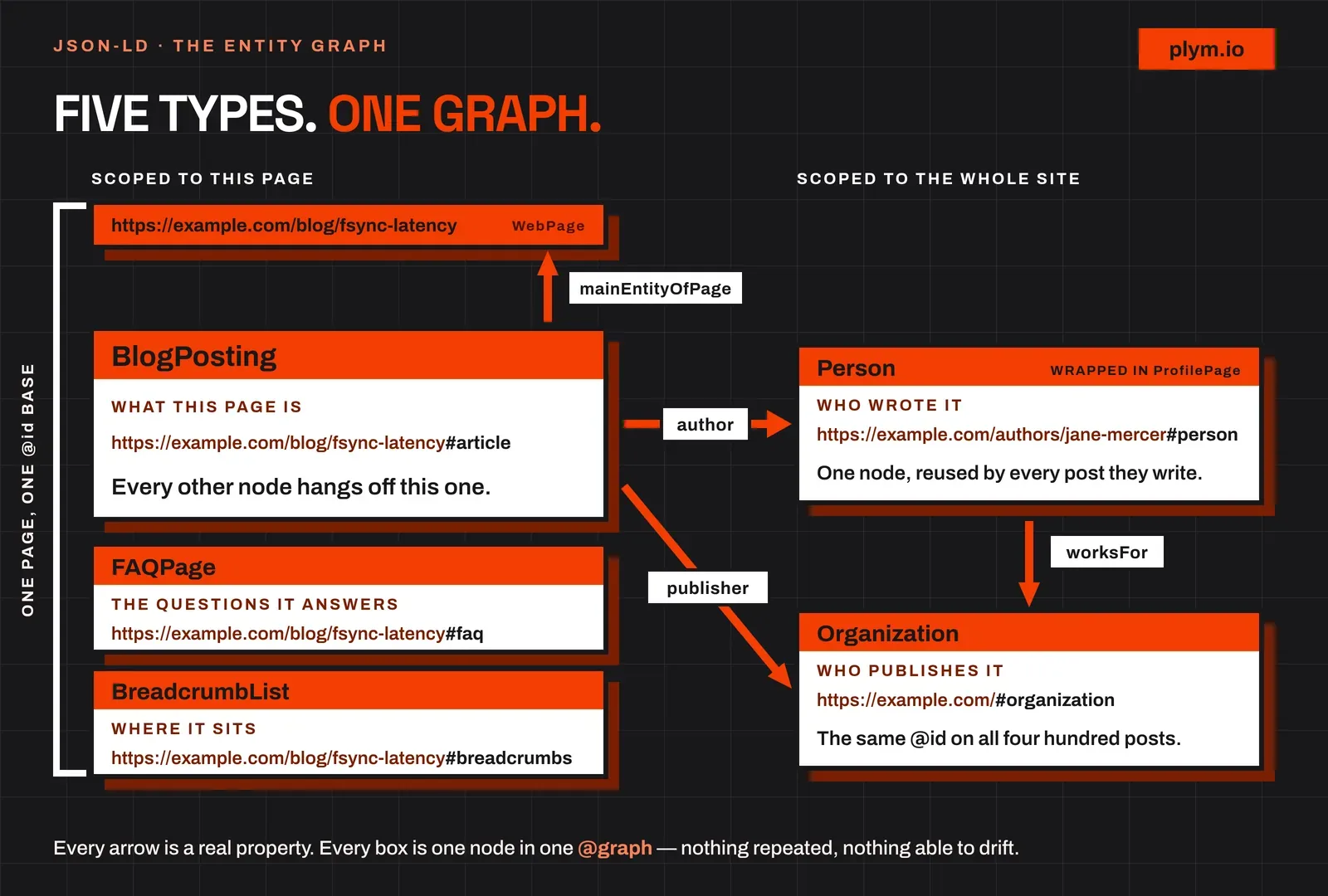
Stitch the five into one graph with @id
Most copy-paste guides stop at five separate script tags. That works. Linking them together works better, and it costs one extra property per block.
Every block above carries an @id. Those identifiers let one block reference another instead of repeating it. BlogPosting.author points to #person. BlogPosting.publisher points to #organization. Person.worksFor points to the same #organization. Nothing is duplicated, nothing can drift out of sync, and a parser receives one connected graph rather than five disconnected assertions.
Put them in a single @graph array in one script tag:
{
  "@context": "https://schema.org",
  "@graph": [
    {
      "@type": "Organization",
      "@id": "https://example.com/#organization",
      "name": "Example",
      "url": "https://example.com/",
      "logo": {
        "@type": "ImageObject",
        "url": "https://example.com/static/logo.png"
      },
      "sameAs": ["https://github.com/example"]
    },
    {
      "@type": "Person",
      "@id": "https://example.com/authors/jane-mercer#person",
      "name": "Jane Mercer",
      "url": "https://example.com/authors/jane-mercer",
      "worksFor": { "@id": "https://example.com/#organization" },
      "sameAs": ["https://github.com/janemercer"]
    },
    {
      "@type": "BlogPosting",
      "@id": "https://example.com/blog/fsync-latency#article",
      "headline": "What fsync Actually Costs You",
      "datePublished": "2026-07-14T09:00:00+00:00",
      "dateModified": "2026-07-28T16:30:00+00:00",
      "author": { "@id": "https://example.com/authors/jane-mercer#person" },
      "publisher": { "@id": "https://example.com/#organization" },
      "image": ["https://example.com/media/fsync-16x9.webp"],
      "mainEntityOfPage": {
        "@type": "WebPage",
        "@id": "https://example.com/blog/fsync-latency"
      }
    },
    {
      "@type": "FAQPage",
      "@id": "https://example.com/blog/fsync-latency#faq",
      "mainEntity": [
        {
          "@type": "Question",
          "name": "Does fsync slow down every write?",
          "acceptedAnswer": {
            "@type": "Answer",
            "text": "No. fsync blocks only until the kernel confirms the write reached durable storage."
          }
        }
      ]
    },
    {
      "@type": "BreadcrumbList",
      "@id": "https://example.com/blog/fsync-latency#breadcrumbs",
      "itemListElement": [
        {
          "@type": "ListItem",
          "position": 1,
          "name": "Home",
          "item": "https://example.com/"
        },
        {
          "@type": "ListItem",
          "position": 2,
          "name": "What fsync Actually Costs You"
        }
      ]
    }
  ]
}
Two rules make this reliable. Use absolute URLs with fragment identifiers, never bare strings like "#org" — a fragment alone is ambiguous across pages. And use the same @id for the same entity everywhere on your site, so that four hundred posts referencing https://example.com/#organization all resolve to one node instead of four hundred lookalikes.
The cargo-cult schema types to skip
These get copied from old tutorials and template libraries. Every one of them is dead weight on a blog.
WebSite+SearchAction. This powered the sitelinks search box, which Google removed on 21 November 2024. The markup now does nothing.WebSiteitself is still supported for site names, so keep that part if you use it — just drop thepotentialActionblock.HowTo. Rich results removed on desktop and mobile in September 2023. If your post is genuinely a tutorial, write clear numbered steps in visible text. That is what gets extracted now.speakable. Still in beta, still limited to English content for US Google Home users. Unless you are a US news publisher, it is a no-op.ReviewandAggregateRatingabout yourself. Google's policy is explicit: if the entity being reviewed controls the reviews about itself, itsOrganizationorLocalBusinesspages are ineligible for the star feature. Testimonials on your own site do not qualify. Neither do embedded third-party review widgets showing reviews of you.- The June 2025 seven. Book Actions, Course Info, ClaimReview, Estimated Salary, Learning Video, Special Announcement, Vehicle Listing. All retired on 12 June 2025.
WebPageon every page. No rich result, no resolve value beyond whatmainEntityOfPagealready gives you. Harmless, but it is bytes and one more thing to keep correct.- Three article types stacked on one post.
Article,BlogPosting, andNewsArticleon the same page is a common plugin behaviour and it is noise. Pick one. Producton a blog post. It will not produce a product rich result for an article, and misappliedProductmarkup is a structured data policy violation.
The general test: if a type does not produce a rich result and does not state a fact that disambiguates an entity, it is doing nothing. Delete it.
How to validate, and what the validators miss
Three tools, in order:
- Schema Markup Validator — checks your JSON-LD against the schema.org vocabulary itself. Use this first. It is the only one that catches a misspelled property Google happens to ignore.
- Google Rich Results Test — checks eligibility for Google's remaining features. It will not show FAQ after June 2026, and that absence is expected.
- Search Console » Enhancements — the only view of aggregate errors across every URL, on the pages Google actually crawled. A template bug shows up here and nowhere else.
What none of them check: whether the markup is true. A validator will happily approve a dateModified of tomorrow, an author who does not exist, and an acceptedAnswer that contradicts the paragraph above it. Green checkmarks measure syntax. Accuracy is on you, and it is the part that decays — markup written once and never revisited is the most common source of a page that describes itself incorrectly for two years.
The implementation order that gets you there fastest
Organizationon your home page, with a completesameAsarray. One block, sitewide payoff, and every other type depends on it.BlogPostingin your post template, withauthorandpublisheras@idreferences. Generate the dates from your real publish and edit timestamps.BreadcrumbListin the same template, driven by your existing category structure. Cheapest visible win on the list.Personon author pages, wrapped inProfilePage, withsameAspointing at profiles that already have standing.FAQPageonly on posts where real questions already appear in the body.
Templates are the only sane place for any of this. Hand-written JSON-LD drifts from the content within a month — a title gets edited, a date does not, and now your markup is lying. On plym, the post template renders BlogPosting and FAQPage from post data automatically, which is the right shape for the problem: the markup is a projection of the content, so it cannot disagree with it.
Budget an afternoon for the whole thing. Once it is in the template, the ongoing cost is zero, and you have removed a whole category of ambiguity about who you are and what you publish — which is the only thing structured data was ever able to do for you.
Sources: